Draw against commission sounds simple until the report lands. One home services company saw $9,900 earned against $24,000 in draws. Here's the fix.
A draw against commission looks like a safe compromise. The company advances a fixed amount every week, the salesperson earns commission on closed jobs, and the two settle up over time. The rep gets stability, and the owner gets accountability. But a draw only works when everyone can see, in one place, how much commission has actually been earned against how much has been advanced. For one home services company selling and installing outdoor lighting and shades on the West Coast, nobody could see that until a commission and draw report landed on the table.
The report showed roughly $9,900 in commission earned against $24,000 in draws paid. That is a $14,100 gap, and it raised a fair question: is the plan broken, or is the data? The answer turned out to be a little of both, and working through it is a useful template for any owner running a draw against commission for a salesperson today.
How a Draw Against Commission Quietly Falls Behind
The setup was simple. A sales rep received a $1,000 weekly draw, and commission from closed jobs was supposed to cover it. When commission in a week exceeds the draw, the rep is paid the difference. When it falls short, the shortfall carries forward as a deficit. That is how a recoverable draw works, and it is a reasonable way to give a commission-based rep a steady paycheck while they build a pipeline.
The trouble is what happens when the deficit is invisible. Across the period the report covered, the draws added up to $24,000. Commission earned came to about $9,900, which means commission covered only about 41% of what had been advanced. In only two weeks, around week 6 and again around week 18, did commission climb above the $1,000 draw. Every other week the deficit grew.
Owners tend to read a number like that in one of two ways. Either the rep is underperforming, or the draw is set too high for the pipeline. Both are possible. But before making a call about anyone's pay, this company asked a more basic question: does the report include every dollar of commission the rep actually earned? That question is the same one behind paying techs on money you never collected, only in reverse. There, the report counted revenue that did not exist. Here, the report might be missing revenue that did.
Why the Draw Against Commission Numbers Could Not Be Trusted Yet
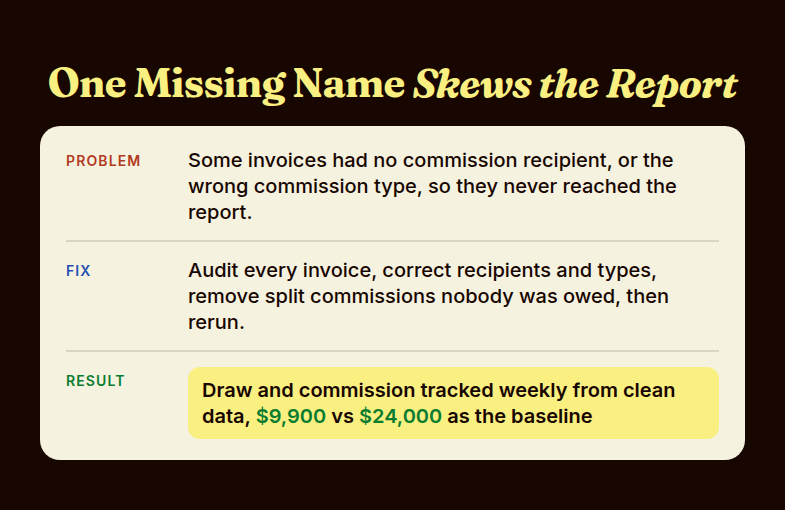
The report was only as good as the invoices feeding it. It pulled commission from invoice paid dates, and it relied on two fields being filled in correctly on every invoice: who received the commission, and what type of commission it was. If either field was blank or wrong, the invoice quietly dropped out of the report or landed in the wrong place. Nothing errored. The total just came out smaller than reality.
There was a second problem hiding in the same data. Another employee had been added to some jobs as a split-commission recipient, including jobs where the split was never supposed to apply. Each of those splits carved commission away from the rep whose draw was being tracked. Between missing recipients, wrong commission types, and stray splits, the $9,900 figure was a floor, not a verdict.
The team did not argue about it. They agreed on the fix: audit every invoice, verify the recipient and commission type, remove the second employee from split commissions except for the one sale where the split was legitimate, and rerun the report on corrected data. Until that audit was done, no one would make a decision about the rep's draw. That restraint is the most useful habit in this whole story. A pay decision made on a report you do not trust is worse than no decision at all.
Rebuilding the Draw Against Commission Process Around Clean Invoice Data
The audit was the foundation, but the company did not stop at a one-time cleanup. The goal was a repeatable weekly process, so the next $24,000 in draws would never again pile up without anyone noticing. Three changes did the work.
First, every invoice gets a named recipient and a commission type. An invoice with no recipient is now treated as an error to fix before the week closes, not a detail to sort out later. The report only sees what is filled in, so the fix has to happen at the source.
Second, the report shows the whole picture, not just commission. The layout the company settled on lists each pay period with its start and end dates, then the commission earned that week, cumulative commission, the weekly draw, cumulative draw paid, the running deficit, and the actual payout. It also flags company-generated leads and can filter by recipient, so a split or a lead-source question takes seconds to answer instead of an afternoon of spreadsheet work.
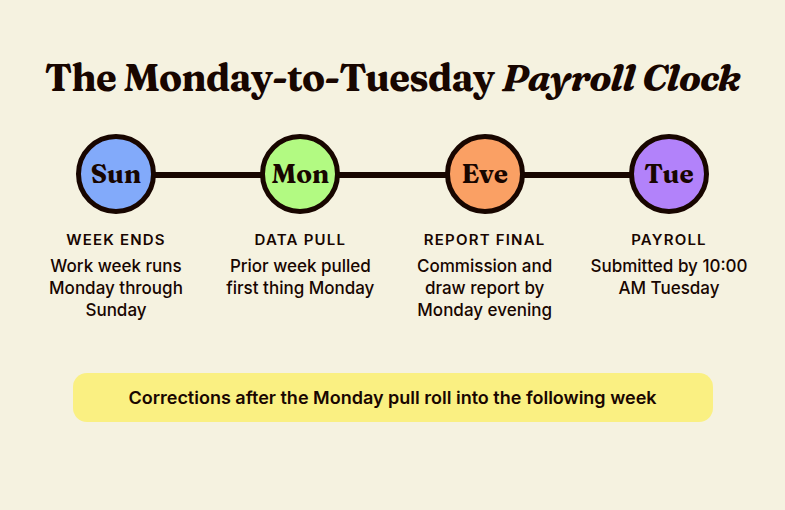
Third, the whole thing runs on the payroll calendar. The work week runs Monday through Sunday. The prior week's data is pulled first thing Monday, the finalized commission and draw report is ready by Monday evening, and payroll is submitted by 10:00 AM Tuesday. That leaves very little slack, so the company made a simple rule: any correction made after the Monday pull rolls into the following week instead of delaying payroll. It is a small policy, and it keeps a tight cycle from turning into a weekly scramble.
A second salesperson made the case for the process even more clearly. That rep started on a $1,250 weekly draw beginning the work week of August 31, but had no commission history yet. Without tracking, that draw would have sat as an unexplained cost. Instead, the report was backdated to the first draw week, so the deficit is visible from day one, and everyone knows exactly how much commission the new rep needs to earn to clear it.
If you are also weighing how to structure the commission side of a plan, the math in the $1,900 or $2,467 commission plan decision is a good companion. And for a closer look at what happens when commission is tied to the wrong revenue, see how one HVAC company closed a $100,000-revenue, $3,000-commission pay gap.
Profit sharing
made simple.
Give your team a stake in the company’s success. ShareWillow helps you create and manage profit-sharing programs that motivate employees and drive business results.
The Result: A Draw Against Commission Report You Can Actually Act On
The headline numbers did not change overnight: about $9,900 earned against $24,000 in draws is the baseline, and the audit will decide how much of that gap was real. What changed is that the company now has a way to tell the difference. When the audit finishes and the report is rerun, the owner will know one of three things:
- The gap mostly closes, which means the plan was fine and the data was hiding earnings.
- The gap stays wide, which means the draw is too high for the current pipeline and needs to come down, or the commission rate needs a second look.
- The gap shrinks but does not close, which points to a mix of both and a specific set of invoices worth reviewing.
Any of those is a decision the owner can make with confidence. That is the real payoff of tracking a draw against commission carefully: not a better number, but a trustworthy one. The rep also benefits. A salesperson who can see their own commission, draw, and deficit each week is far less likely to be surprised by a pay conversation, and far more likely to believe the answer when it comes.
How to Check Your Own Draw Against Commission Setup
You can run this audit in an afternoon. It is worth doing any time a draw has been running for more than a couple of months, or any time a new rep starts one:
- Add up the total draws paid to date, then the total commission earned to date, and compare them.
- Pull every invoice from the period and confirm each one has a commission recipient and a commission type.
- Check every split commission and confirm each person on it is actually entitled to a share.
- Decide whether the draw is recoverable or non-recoverable, and write it down so the rep and the office agree.
- Set a weekly cutoff for corrections so the report and payroll always match.
If a spreadsheet is doing this work today, that is usually where the invisible gaps come from. ShareWillow's plan tracking and payout reports pull commission, draw, and deficit together each pay period for field service and home services teams, and the commission pay guide walks through the plan design behind the numbers.
FAQ: Draw Against Commission
What is a draw against commission?
A draw against commission is an advance on future commission. The company pays a fixed amount each pay period, and the salesperson's earned commission is applied against that advance. If commission exceeds the draw, the rep is paid the difference. If it falls short, the shortfall is either carried forward or forgiven, depending on the type of draw.
What is the difference between a recoverable and non-recoverable draw?
With a recoverable draw, any shortfall carries forward as a deficit that future commission must repay. With a non-recoverable draw, the rep keeps the advance even if commission never catches up. Recoverable draws protect the company, while non-recoverable draws protect the rep, so pick one deliberately and put it in writing.
How do you track a draw against commission?
Track it weekly in one report that shows commission earned, the draw paid, cumulative totals, and the running deficit. Each invoice needs a named commission recipient and commission type, or it will not appear. A weekly cutoff for corrections keeps the report matched to payroll.
Related reading
Conclusion
A draw is only as honest as the report behind it. Audit the invoices first, then decide what the numbers mean.
Create incentives
that
drive results
You shouldn't need complex equity plans to align your team. ShareWillow makes it simple to create transparent profit-sharing programs that motivate employees and grow your business.

Incentive plans to help
small businesses thrive.
.png)
"I was able to leverage the knowledge of the ShareWillow team to learn how other companies were designing their bonus plans. The template was extremely helpful."

Brian Tustin
Owner, First Rate Movers