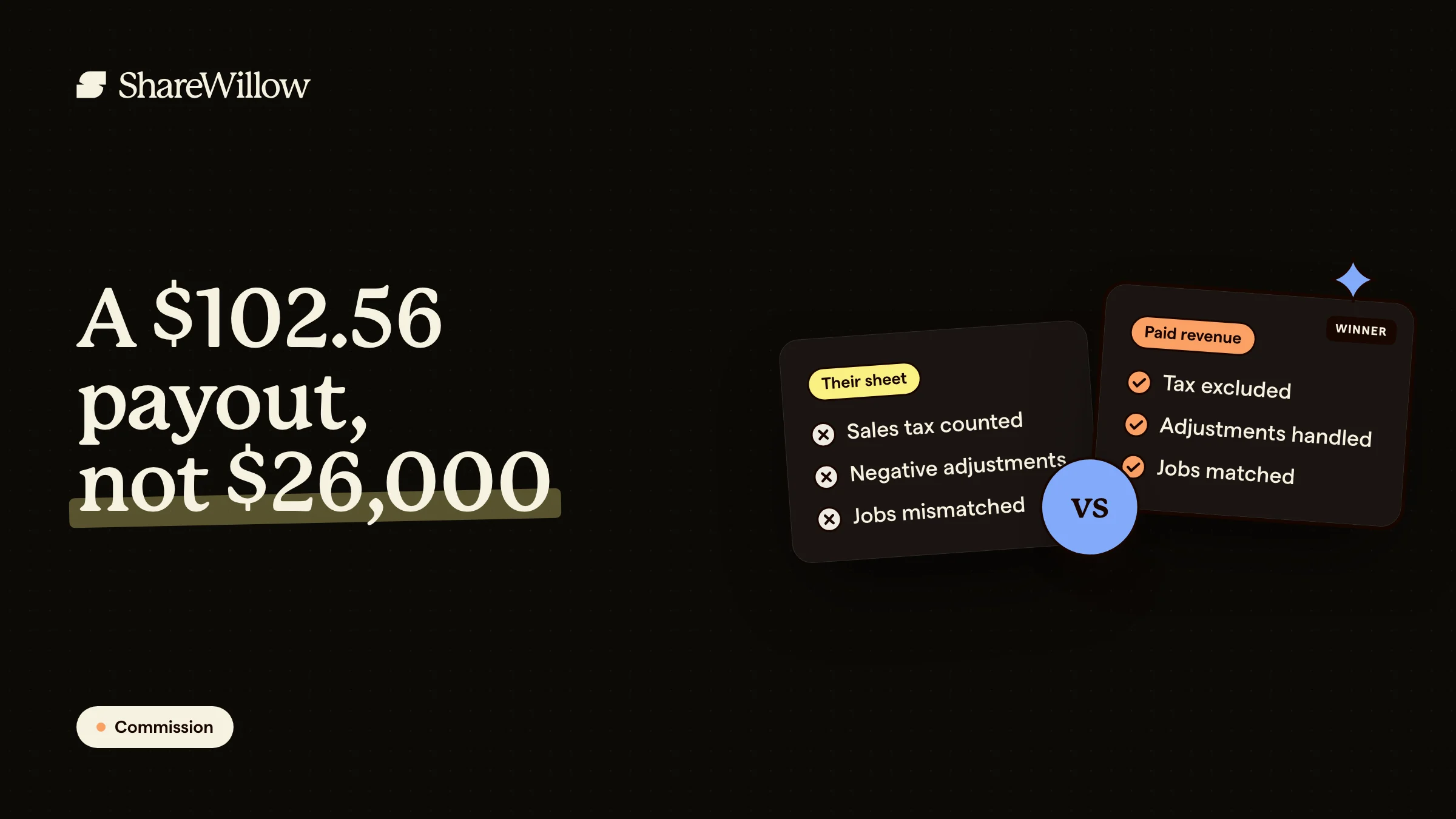
Technician commission on paid revenue fixed a $102.56 vs $26,000 payout gap by excluding sales tax, ignoring negative adjustments and matching jobs by ID.
Technician commission on paid revenue sounds like a settings choice until a payout report disagrees with the office by more than $25,000. That is what a home services company running ServiceTitan found during a support call with the ShareWillow team. One technician's September report showed $102.56. The office's own revenue sheet, built from ServiceTitan, showed $26,000 for the same person.
Nobody had stolen anything and nothing was broken in the usual sense. The company had a handful of small rules about what counts as revenue that nobody had written down, and each one nudged the number a little. This is the story of how they found those rules, what they decided, and what is still open.
The Problem: Two Reports, Two Answers
The company pays technician incentives from a custom report that combines ServiceTitan invoices with a flag from a job-photo app. A technician earns credit when the job is marked "yes" in the photo app, which is how the owners confirm the paperwork and photos are complete. It is a good control. It also means two systems have to agree before a job counts.
The office manager reconciles every technician by hand before a payout. The review takes at least an hour per technician if nobody interrupts, and ServiceTitan does not produce an equivalent report with job splits. So the office compares its own sheet to the ShareWillow report line by line.
For one technician in September, that comparison came out ugly:
- The ShareWillow report showed $102.56.
- The office sheet showed about $26,000.
- One $454 job was missing entirely, and the other listed jobs appeared but were not calculating the way the office expected.
October added a second problem. Photo-app updates marked "yes" during the month were missing from the report when it was downloaded in November, even though the data is supposed to sync daily.
Technician Commission on Paid Revenue, Not Invoice Totals
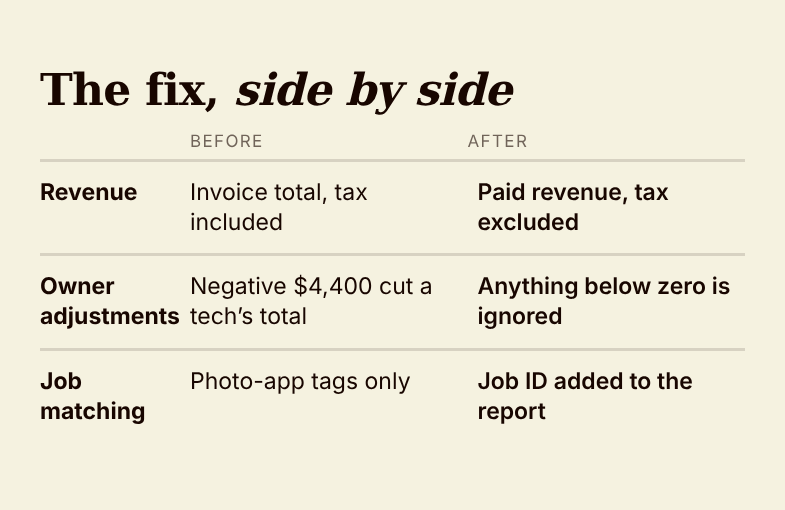
The first rule the team found was the quiet one. The report was building technician revenue from invoice totals, and invoice totals include sales tax. Tax is money the company collects for the state. It was never the technician's to earn commission on, and it was never the company's revenue either.
The owners and the office manager agreed on the correct base during the call: paid revenue, excluding tax. The calculation was changed across every technician before the meeting ended.
The change does two things at once. It removes tax from the base, and it removes anything the customer has not paid. If you have read about how to handle open balances, this is the same logic that sits behind completed date versus paid date for technician commission, where unpaid jobs counted toward bonuses before a dollar was collected. The shorter version: a commission base should be money the company actually has.
There are tradeoffs, and it is worth naming them. Some software, including ServiceTitan's own revenue-based pay setup, bases commission on the invoice subtotal, and depending on your state, you may decide tax belongs in or out. The right answer is the one you write down before the first payout. What matters is that the plan, the report, and the pay stub all use the same base.
For a related angle on what else comes out of the base, see how one company took card fees, finance fees, and a $3,000 warranty out of the commission base in commission on net revenue for an HVAC and plumbing company.
The Second Rule: Negative Adjustments Do Not Reduce a Technician
While reviewing one technician's jobs, the office found an owner adjustment of roughly negative $4,400. It was a bookkeeping entry, not a mistake the technician made, but under the old logic it dragged that technician's revenue down by the full amount.
The company's position was simple: a negative adjustment on the owner's side should not reduce a technician's credit. The ShareWillow team added a rule so that amounts below zero are excluded from a technician's total. A technician can still be credited for what they sold and completed, and an accounting correction elsewhere does not erase it.
This is the kind of rule that only shows up when you reconcile real jobs. Nobody designs it at kickoff, and everyone wants it once they see the first adjustment land on the wrong person.
The Third Rule: Every Job Needs an ID
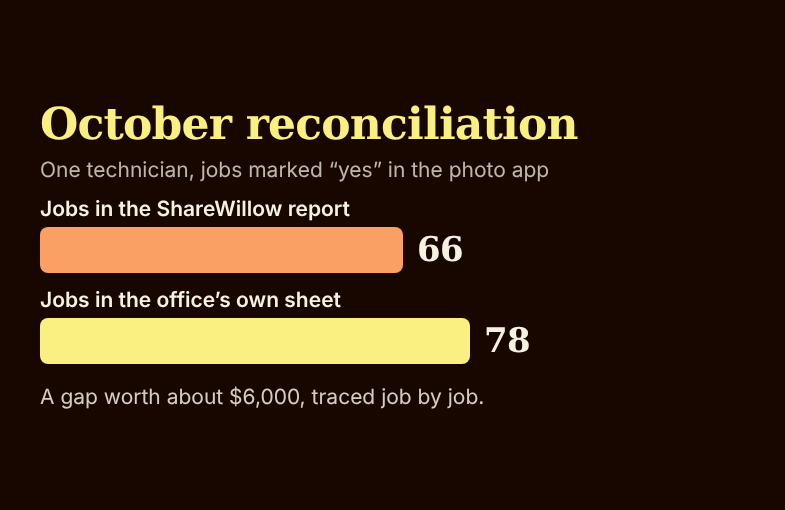
The October mismatch was harder. For one technician, the ShareWillow report showed 66 jobs and the office's sheet showed 78 jobs marked "yes." The difference was worth about $6,000, and it could not be settled by looking at totals.
The fix for that kind of gap is a join key. During the call, the office manager added a Job ID field to the combined report and saved it. With an ID on every row, a job in one report can be matched to the same job in the other, and the missing twelve can be found by name instead of by guess.
The team also found that duplicate entries still needed to be removed from paid revenue before the total was final. That is a clue to where some of the gap lives. Duplicates inflate one side, missing jobs deflate the other, and without an ID you cannot tell which is which.
What Changed in the Numbers
After the paid-revenue switch and a resync, the October figures moved:
- One technician's October number dropped from about $45,000 to about $41,000, with paid revenue reading $41,547 across 66 jobs.
- Another technician's October total, recalculated on paid revenue, came to $22,320.
- The September technician went from a report that could not be trusted to a list of specific jobs to check.
A drop of about $4,000 in one technician's revenue is the point of the exercise. That is revenue that would have counted toward commission and did not belong there. It is also a number that makes a technician nervous, which is why the company wanted to review each person before sending the November payout.
The 66 versus 78 question was still open when the call ended. The ShareWillow team committed to comparing the two lists invoice by invoice and sending the findings before payday, and the office agreed to hold a pending payout until then. We do not yet know how many of the twelve jobs were missing, how many were duplicates, and how many were never paid. That is the honest state of the story, and the follow-up is where the final number will come from.
How to Set Up Commission on Paid Revenue
If you want to run the same reconciliation on your own plan, here is the checklist these companies keep coming back to.
- Write the base down. "Paid revenue, excluding tax" is a complete sentence. "Revenue" is not.
- Decide what happens to adjustments. Negative owner adjustments should not reduce a technician, and the plan should say so.
- Add a job ID to every report. If two reports cannot be joined by ID, reconciliation will always be manual.
- Reconcile one technician before everyone. Pick the person with the biggest gap and chase it to the invoice. The fix usually applies to everyone.
- Remove duplicates before you total. A paid-revenue total with duplicate lines is just a different wrong number.
- Watch your sync dates. If a field in another app drives credit, check that it landed before the report was pulled.
- Review before you finalize. The first two or three payouts are for verifying the data, not for automating it.
For the broader plan design question of how commission and base pay fit together, our guide to HVAC commission pay is a good place to start. If you want to see how a report like this is built from your field service data, the ShareWillow product features page walks through it. And for another case where a report looked fine and was not, read why commission software might pay techs on money you never collected.
The lesson in this story is not that a report was wrong. It is that a commission plan is only as good as its definition of revenue, and a definition that lives in someone's head fails the first time a number is $25,000 off. This company got to a written rule in one call.
Should technician commission include sales tax?
Most companies leave it out. Sales tax is collected on behalf of the state and is not company revenue, so paying commission on it overstates the base. Some software defaults to the invoice subtotal, so check your setup and write down which base your plan uses.
Why calculate technician commission on paid revenue?
It ties pay to cash the company has actually received. Unpaid invoices, refunds, and balances stay out of the base until the money arrives, which avoids paying commission on revenue you may never collect.
How do you reconcile technician commission reports?
Start with one technician and one month. Match every job by ID between your system of record and the commission report, then sort the differences into missing jobs, duplicates, and unpaid invoices. Fix the rule that explains the biggest gap first.
Related reading
- When to Pay Technician Commission: Completed Date vs. Paid Date, and the $6,600 in Open Balances That Forced the Question
- Why Your Commission Software Might Be Paying Techs on Money You Never Collected
- Commission on Net Revenue: How an HVAC and Plumbing Company Is Taking Card Fees, Finance Fees, and a $3,000 Warranty Out of the Commission Base
- Technician Commission Reconciliation: How a Garage Door Company Traced a 16-vs-12 Job Gap to a One-Day Pay Week Offset
- Incentives, Commissions, and Bonuses: What’s the Difference and Why It Matters
Conclusion
Pay commission on revenue the customer has actually paid, minus tax, and make every job traceable by ID before payday.
See what performance pay would pay your techs.
On a free call, we'll show you what your techs would earn for the great work they already do.
Book a free call
Ryan Shank is the founder of ShareWillow. Before ShareWillow, he spent 15 years building software for the trades and founded PhoneWagon, which CallRail acquired.